Kanban and decks
Decks, cards, and lanes you actually use: features, bugs, polish, spikes. Filter by milestone without cloning a 40-field issue type forest.
Scene pins
Object pinning keeps the card next to the mesh, trigger, or spawn you are editing. The guild still sees the same work on the web board. No private editor sticky notes.
Same charcoal cards as Features. Icon beside the title. Get Started lives in the close band at the bottom.
Attach a card to the GameObject, prefab, or script you are editing. Open the same work from Scene View. Not a private sticky pad.
Learn more
Unity Bridge is in early beta: same Hand, lanes, and Scene pins in the editor. Unreal follows the same deep-link model. The web board stays the record.
Learn more
A small active set with a real WIP cap. Pull a few cards, ship them, then draw again. The rest of the board stays visible and quiet.
Learn more
Full-screen Hand with checklist, comments, and a timer. The board noise stays outside so you can move a mesh, write a system, or cut a scene.
Learn more
Decks, cards, and lanes you actually use: features, bugs, polish, spikes. Filter by milestone without cloning a 40-field issue type forest.
Name the current ship. Date a gate when the playtest is real, or park it. Hand refill can follow the current milestone so the day stays honest.
Scene view with pins on GameObjects and the Inspector on a Scene Pin component. The live Unity Bridge package is early beta.
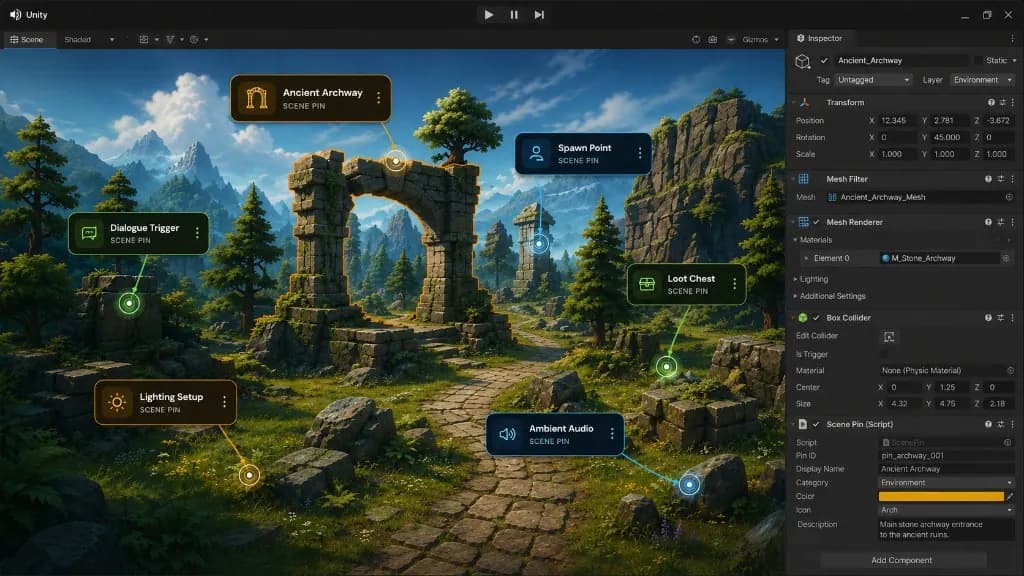
Pick a card, pin it to a GameObject, and keep a deep link between the Scene and your Hand. Object pinning is for makers who live in Scene View but still need guild-visible work.
The web app remains the system of record. Pins do not become orphaned editor sticky notes that only one person can find.
Scene-note plugins are useful for local reminders. Brainloot Scene pins pair task pinning with Hand, Focus Mode, XP, and guild boards so production and editor stay on one card.
Scene pins ship with Unity Bridge in early beta. Unreal Bridge is next with the same deep-link idea. Start free on web, then connect the editor companion when you are ready.
Start free, pull a few cards into My Hand, and ship from one studio board.
© 2026 BRAINLOOT LTD. All rights reserved.